
How to Monitor Band Usage
The Band Usage section on the History Page allows authorized users to track how SlateSafety BAND V2 devices are being used throughout the day. This feature helps supervisors understand whether devices are worn consistently, how long they remain on-body, and whether they were used correctly to collect accurate physiological data.

Why Band Usage Is Useful
Monitoring Band usage provides valuable insights into device compliance and operational readiness. You can see:
- How many hours each Band was worn per day
- Which user wore the Band
- When the Band was taken off the charger
- When it was placed back on the charger
- When it was worn and whether it was worn correctly
If a Band was technically worn but not worn well enough to collect physiological data, this will also be displayed. This helps supervisors identify training opportunities, troubleshoot improper wear, and ensure data reliability.
How to View Band Usage
- Navigate to the History page of the SlateSafety Web Application.
- Open the dropdown menu at the top of the page.
- Select Band Usage.
- Review the usage table. You can sort by total hours worn to quickly identify which Bands were used the most or the least.
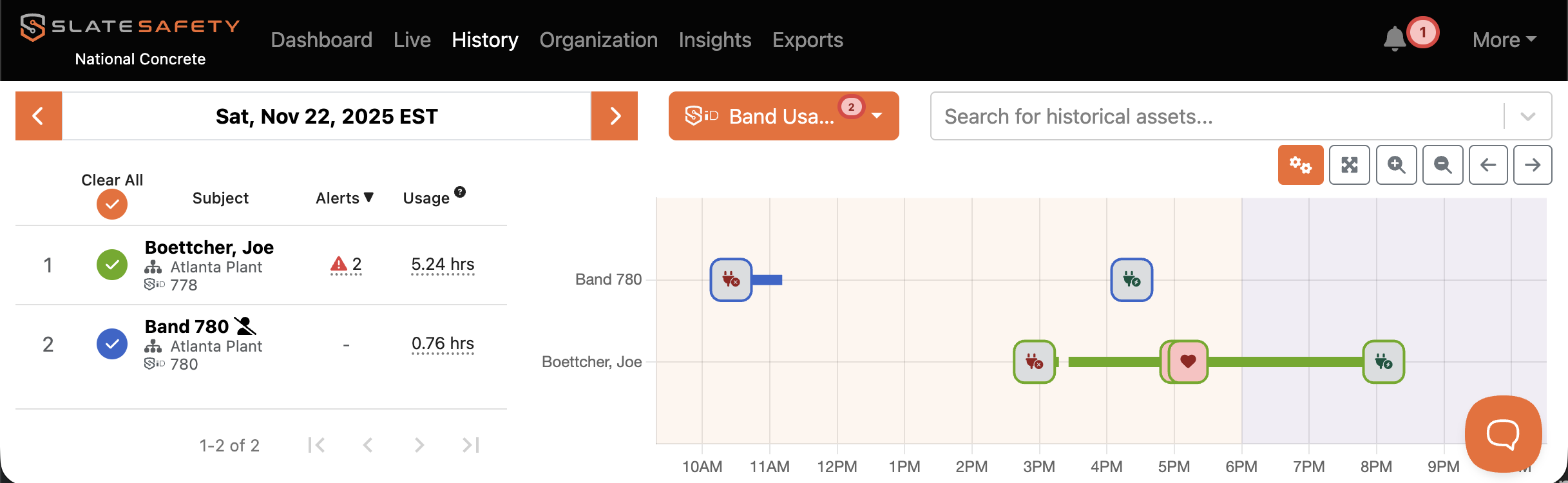
The table will show wear time, alert count, user assignment, and important time-stamps such as when the Band left and returned to the charger.
If you have questions about how to use Band Usage in your workflow, or if you need help interpreting the data, please reach out to our support team.